Platform
Workflows & Orchestration
Real business processes branch, wait on people, call five systems, and fail in the middle. Bhogar executes them as durable graphs - with agents at the steps that need judgement, approvals where authority matters, and a measured cost and cycle time for every run.
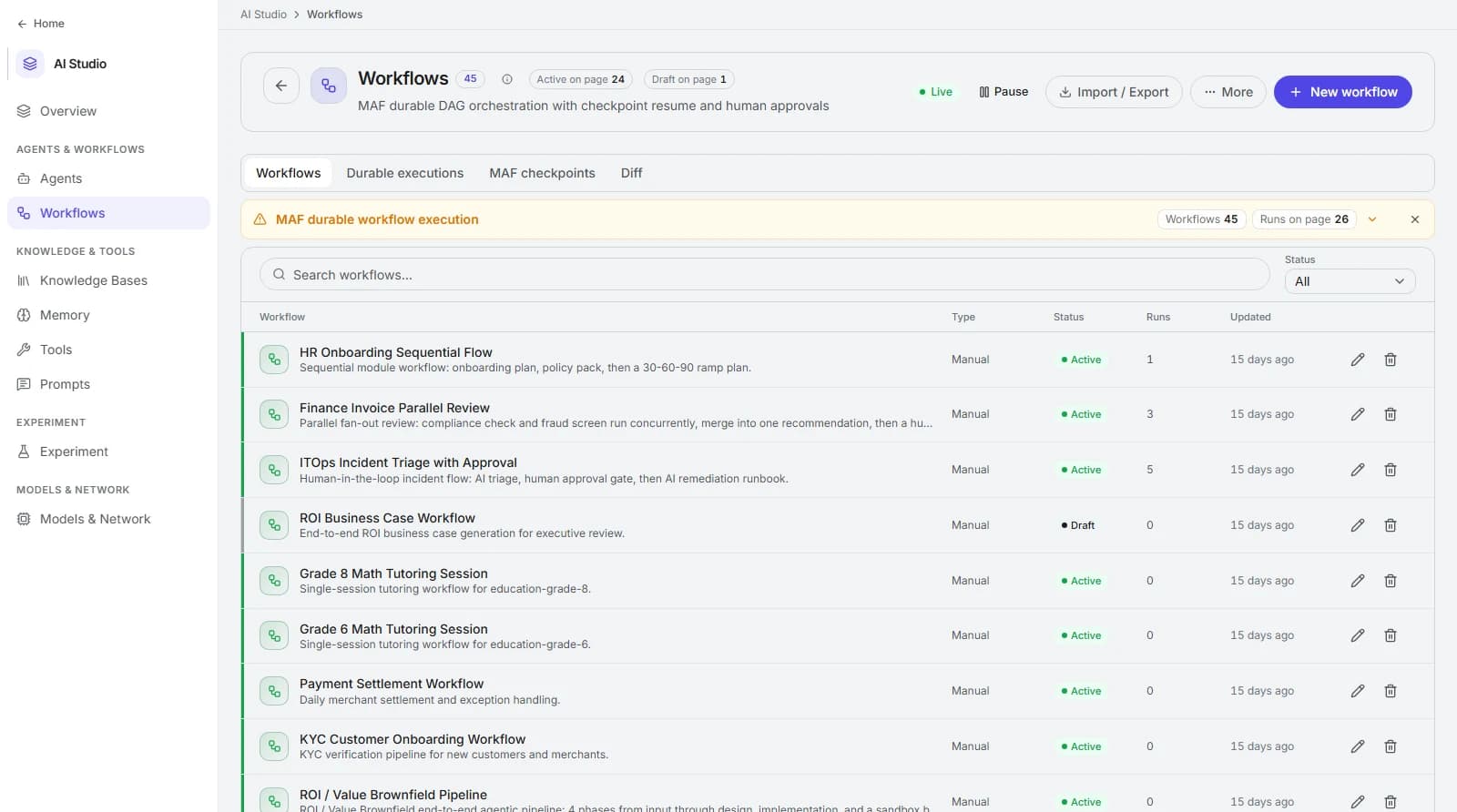
How it works
Building a workflow
The steps below are deliberately boring. Reliable orchestration comes from modelling exceptions early, not from clever prompts.
Model the process
Map the real steps, decision points, and the systems each one touches - including the messy exception paths.
Capabilities
Orchestration capabilities
Everything below is a platform feature rather than a pattern you assemble - which is why processes stay maintainable as they grow past the happy path.
Visual DAG builder
Compose triggers, agent steps, tool calls, conditions, and loops on a canvas that maps one-to-one onto what the engine executes.
Portal - Build → Workflows
Branching and parallelism
Conditions route the path on real data; independent branches fan out concurrently and fan back in when their results are needed.
condition - parallel - join nodes
Agents as steps
Put reasoning exactly where ambiguity lives - classify, extract, draft, decide - while the workflow owns sequencing and state.
agent node
Human-in-the-loop approvals
Pause a run for a named approver without losing state. Approvers see the request, the context that produced it, and the action awaiting sign-off.
approvals queue - SLA visibility
Retries and compensation
Transient failures retry with backoff and idempotency keys; unrecoverable steps trigger compensating actions instead of leaving half-done work.
retry policy - idempotent execution
Durable, resumable state
Long-running processes survive restarts and waits - a run can sit on an approval or an external callback for days and continue exactly where it stopped.
persisted run state
Triggers that fit your systems
Start runs from webhooks, schedules, platform events, an API call, or an agent handoff - so processes begin where the work actually appears.
webhook - cron - event - API
Sub-workflows and versioning
Reuse proven sequences as sub-workflows, version definitions, and roll back a change without rewriting the processes that depend on it.
composition - versions - rollback
Execution visibility
Every run has a trace: which node ran, how long it took, what it cost, which warnings it raised, and where it stopped.
execution detail + warnings
Process shapes
Common workflow patterns
If your process resembles one of these, the orchestration model already fits - most rollouts start by moving one of them off email and spreadsheets.
- Intake to resolution
- A request arrives, gets classified and enriched, is resolved or routed, and the outcome is written back to the system of record. The most common shape across support, IT, and operations.
- Review and approval chains
- Bhogar prepares the work - extraction, checks, a drafted decision - and one or more named approvers sign off. State survives the wait, and every approval is audited.
- Scheduled analysis and reporting
- Cron-triggered runs pull fresh data, ask agents to analyse it, and deliver briefings or dashboards. Useful where the value is regular attention, not on-demand answers.
- Event-driven reaction
- A webhook or platform event starts a run within seconds - a new ticket, a failed payment, a deployment, an alert - so Bhogar reacts rather than waiting to be asked.
- Batch and document processing
- Fan out across many records or files in parallel, apply the same extraction and validation to each, and fan in a consolidated result with per-item error handling.
- Multi-system reconciliation
- Compare records across two or more systems, explain the differences with retrieved context, and either correct them under policy or raise an exception for a human.
Governance
Governance and approvals
Orchestration expands what runs without a human. The controls below are what make that acceptable to risk, finance, and audit.
Waiting and handoffs disappear when the process runs itself between decisions.
Cycle-time reduction
run start-to-finish duration vs baseline process time
Fully loaded cost per completed process, including model and tool spend.
cost to serve
per-run cost from Observe ÷ completed runs
Volume a team can absorb without adding headcount.
Throughput
completed runs per period, per workflow
Validation and idempotency remove the silent double-handling that costs twice.
Error and rework rate
failed / retried / compensated step counts
How much human attention the process still consumes - and where.
Approval load
approval events and wait time per workflow
Predictable completion instead of best-effort queues.
SLA adherence
runs completed inside target duration
FAQ
Frequently asked questions
What happens when a step fails halfway through?
Can a run wait for a human without timing out?
How is this different from a generic automation tool?
Do engineers need to be involved?
How do we roll out a change safely?
Related capabilities
Explore the rest of the platform
Judgment
Guardrails & Governance
Policy enforcement, PII handling, RBAC, tenant isolation, and audit trails on every request and action.
Self-awareness
Observability
Traces, evaluations, quality monitoring, and cost/latency/token analytics across every run.
Outcomes
ROI & Value
Baseline, instrument, and report business value - hours saved, cost to serve, deflection, and payback.
See Bhogar on your own data
Book a 45-minute working session. We connect one of your sources, build one agent, run one governed workflow, and review the trace together.