Use case · Use case - Knowledge
Unified knowledge search
Knowledge does not live in the wiki. It lives in the wiki, the ticket, the pull request, the contract, the deck, and a Slack thread from March. BhogarAI indexes all of it into one safe platform that answers with citations and respects every permission on the way.
ROI lever
Hours lost to searching
Search time is the most under-measured cost in a large company because it is spread thinly across everyone. Sample it honestly for two weeks and it is usually the largest single line in the business case - and unlike headcount, it compounds with every system you add.
Reads from
- Wikis and document stores
- Tickets, cases, and CRM
- Code and technical systems
- Chat, email, and records
The problem
Ten search boxes, none of which know about the others.
Every system you buy adds another place to look. People stop looking, ask a colleague instead, and two people lose time instead of one - or worse, they act on the first document they find, which turned out to be superseded.
Checked by hand today
- Wikis and document stores
- Tickets and case systems
- Code repositories and PRs
- Chat and email threads
- Contracts and signed records
- Databases and warehouses
““What do we know about this across everything - and which of it is still current?””
Findability degrades as the company grows
Each new tool has its own search, its own relevance model, and its own idea of what a document is. Nobody can answer a cross-system question without knowing in advance where the answer lives.
Permissions make naive indexing dangerous
A single index across HR files, contracts, and engineering systems is a data-leak incident waiting to happen unless access is evaluated per requester at query time, not filtered afterwards.
Stale answers cost more than no answer
Without freshness and version signals, retrieval happily returns last year’s policy or a deprecated runbook, and the person acting on it has no way to tell.
How Bhogar helps
How Bhogar handles unified knowledge search
Hybrid retrieval combines semantic and keyword matching so exact identifiers work as well as conceptual questions, and every result is checked against the requester’s entitlements before it reaches the model.
Sources
- Wikis and document stores
- Tickets, cases, and CRM
- Code and technical systems
- Chat, email, and records
Outcomes
- Cited direct answers
- Cross-system briefings
- Gap and staleness reports
- Grounding for every agent
Permission-aware at query time
Entitlements are evaluated per requester on every retrieval. Two people asking the same question get answers built from different documents, and neither can infer the existence of the other’s.
How it works →Hybrid retrieval across content types
Semantic and lexical search run together so an error string, a contract number, and a vague conceptual question all work - across documents, tickets, code, and structured records.
How it works →Freshness and version awareness
Documents carry review dates and revision status. Current sources are preferred, and superseded material is labelled when returned rather than presented as fact.
How it works →Answers, not link lists
Bhogar synthesises a direct answer with inline citations, so people verify a claim in one click instead of opening nine tabs to reconstruct it.
How it works →
All your data
Index broadly, expose narrowly.
The corpus can be as wide as your systems allow because the access decision happens per request. Breadth is what makes cross-system answers possible; per-requester scoping is what makes breadth safe.
Document and content platforms
Wikis, intranets, shared drives, and knowledge bases, with folder and site permissions carried through into retrieval.
Work and case systems
Tickets, issues, CRM records, and project systems - usually the richest source of what actually happened, as opposed to what was documented.
Engineering systems
Repositories, pull requests, architecture decisions, and runbooks, restricted to the teams entitled to them.
Communication archives
Selected channels and mailboxes where decisions are made, connected with explicit scope rather than wholesale.
Contracts and formal records
Executed agreements, policies, and approvals, indexed with their effective dates and owners.
Structured data
Warehouse tables and operational databases queried through approved tools so numeric answers come from the source, not from prose about the source.
Governance built in
- Source-system permissions mirrored into retrieval and re-evaluated on every query, never cached into a shared index.
- Sensitive collections - HR, legal, board material - held in separate scopes that require explicit grants rather than default inheritance.
- Freshness policies per source, with review dates surfaced in citations so readers can judge currency themselves.
- Configurable exclusion of personal drives, draft spaces, and channels you have not approved for indexing.
- Full query and retrieval logging so an access review can answer exactly who saw which document through the assistant.
The workflow
A cross-system question, answered once.
The same retrieval layer grounds every other use case on this site - deflection, incident response, briefing, and reporting all sit on top of it.
Asks a question in plain language
From the portal, a chat client, or inside another application - with their identity and group memberships attached to the request.
In the portal
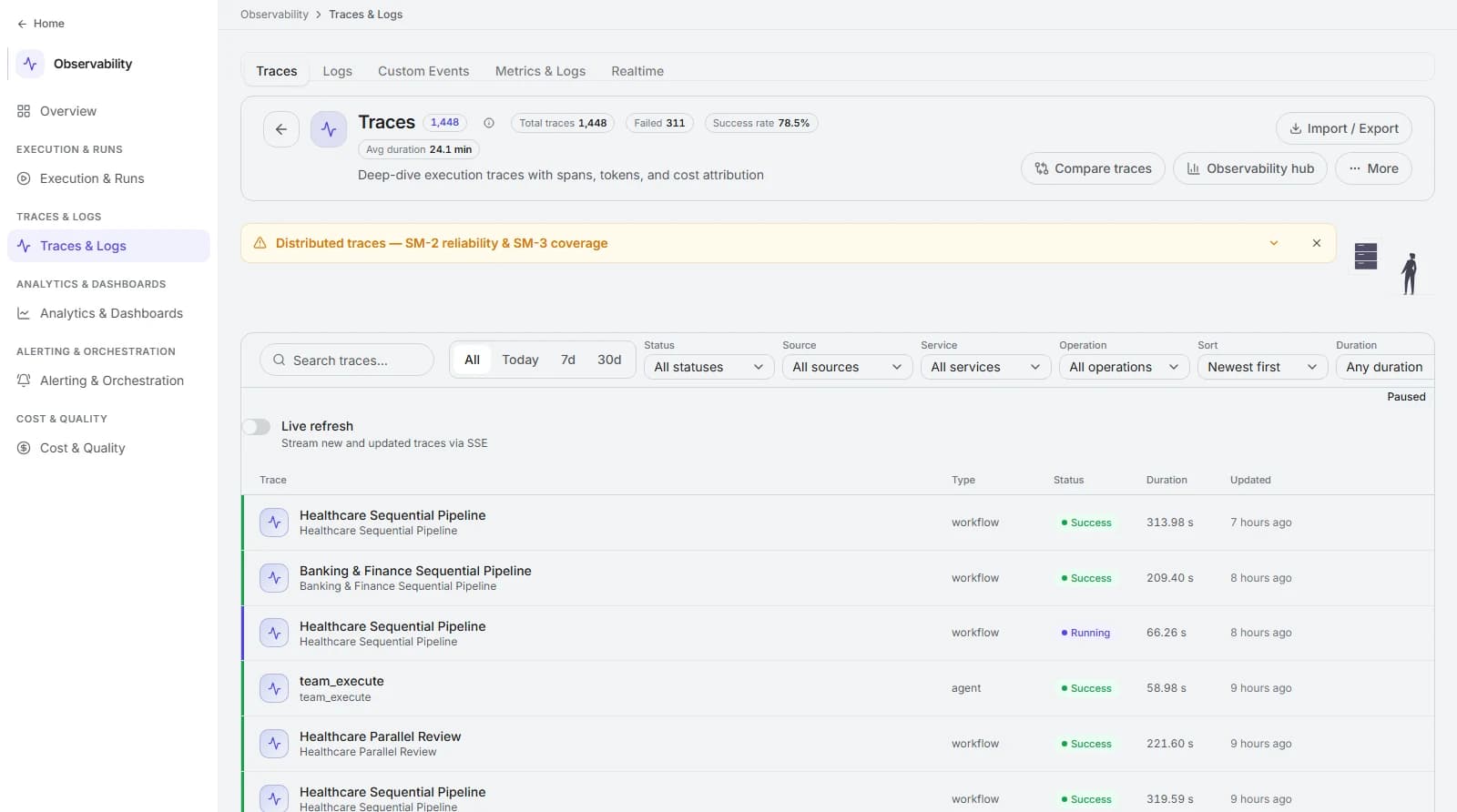
Every run, traced end to end.
1,448 traces with duration, status, and cost attribution - filter by status, source, service, and operation, or stream new runs live.
The return
Search time is the cost. Measure it before you remove it.
Sample search time properly for two weeks before go-live - self-reported estimates are unreliable in both directions. Every metric below is then computed against that baseline.
Hours saved per person per week
(baseline search minutes − post search minutes) × 5 ÷ 60
Segment by role. Time returned to an engineer and time returned to a support agent are worth different amounts and should never be averaged.
Time to answer
median seconds from question asked to verified answer
Include verification. An answer nobody trusts enough to check is not finished work.
Answer coverage
questions answered with citations ÷ total questions
The honest measure of corpus completeness, and the number that tells you where to invest in content next.
Citation click-through
answers where a source was opened ÷ answers given
A trust signal. Very high click-through means answers are not yet convincing; very low may mean people have stopped checking.
| Dimension | Before | With Bhogar |
|---|---|---|
| Cross-system questions | Search four tools, then ask a colleague who probably knows. | One question, one cited answer, sources open in a click. |
| Permissions | Access enforced by each tool, and by people remembering not to share. | Entitlements evaluated per requester on every retrieval. |
| Currency | Superseded documents rank as highly as current ones. | Current sources preferred; superseded material labelled when shown. |
| Knowledge gaps | Invisible until somebody makes an expensive mistake. | Reported weekly as ranked unanswerable questions. |
FAQ
Frequently asked questions
How do you guarantee someone cannot retrieve a document they should not see?
What about content that is simply wrong or out of date?
Do we have to index everything before this is useful?
Can it answer questions about numbers in our warehouse?
Keep exploring
Incident response
Assemble the runbook, the recent changes, the comparable past incident, and the customer impact within seconds of a page - and draft the comms.
Contracts
Extract obligations, deviations, and risk positions from long documents at clause level - with every finding linked to the exact text it came from.
Account briefing
Give every seller a current, cited account brief before every meeting - assembled from CRM, product usage, support history, and your own documents.
Measure your search time first.
We will help you sample it properly, connect the sources that answer your top questions, and report coverage from week one.