Use case · Use case - Operations
Incident response
When the page fires, responders hunt for the runbook, the last deploy, the similar incident from six months ago, and the list of affected customers. BhogarAI assembles all four the moment the incident opens, then drafts the updates while the team fixes the problem.
ROI lever
Mean time to resolve
Most of an incident timeline is not repair, it is orientation: what changed, what does this look like, who is affected, who needs telling. Those four questions are retrieval problems, and removing them from the critical path is where the minutes come from.
Reads from
- Alerts and monitoring
- Deploys and change events
- Runbooks and architecture
- Past incidents and postmortems
The problem
Everything you need exists. None of it is in one place at 3am.
Incident cost is dominated by time to orient and time to communicate. Both are made worse by fatigue, unfamiliar services, and the fact that the person who knows is not on call tonight.
Checked by hand today
- Monitoring and alerting
- Deploy and change history
- Runbooks and architecture docs
- Past incidents and postmortems
- Ticketing and customer impact
- On-call schedules and ownership
““What changed in the last two hours, has this signature happened before, and who is affected right now?””
Orientation eats the critical path
Responders open the monitoring tool, the deploy log, the runbook repository, and the incident history in sequence. Every minute of that is a minute the incident is still running.
Past incidents are written and never read
Postmortems are diligently produced and then buried. The signature of tonight’s failure was described eight months ago by a colleague who has since changed teams.
Communication competes with the fix
Status updates, internal briefings, and account notifications all need writing while the same small group is trying to resolve the issue. Comms slip, and the escalation gets worse.
How Bhogar helps
How Bhogar handles incident response
When an incident opens, Bhogar runs the retrieval a responder would have run manually and posts the result into the incident channel before anyone has finished logging in.
Sources
- Alerts and monitoring
- Deploys and change events
- Runbooks and architecture
- Past incidents and postmortems
Outcomes
- Orientation brief in seconds
- Ranked probable causes
- Drafted status updates
- Postmortem first draft
Change correlation
Recent deploys, configuration changes, feature-flag flips, and infrastructure events touching the affected service are gathered and ranked by proximity in time and dependency.
How it works →Comparable incident recall
The alert signature and symptom description are matched against past incidents and postmortems, returning what the cause turned out to be and what actually resolved it.
How it works →Runbook and ownership resolution
The current runbook for the affected service is retrieved with the owning team, dependencies, and escalation path, so nobody is paging a rota that was reorganised in March.
How it works →Drafted communications
Status page updates, internal briefings, and account notifications are drafted from the live incident state at the tone and detail level you configure - then approved by the incident commander before anything is published.
How it works →
All your data
Read the operational record. Never touch production.
Bhogar observes and assembles. Remediation stays with your existing tooling and your responders - no agent is given the ability to restart, roll back, or scale anything unless you explicitly grant that tool and gate it behind approval.
Monitoring and alerting
Alert payloads, service health, error-rate and latency signals, and the dependency map for the affected service.
Change and deploy history
Releases, configuration changes, feature-flag state, infrastructure changes, and who approved each one.
Runbooks and architecture
Current operational procedures, architecture decision records, service ownership, and escalation paths.
Incident history
Prior incidents, timelines, postmortems, and the mitigations that worked - indexed by symptom as well as by service.
Customer impact
Affected tenants, accounts on the impacted path, contractual notification obligations, and open related tickets.
Communication history
Previous status updates and customer notifications, so tone and detail stay consistent under pressure.
Governance built in
- Read-only by default: production changes remain with your existing deployment and orchestration tooling.
- Any remediation tool that is granted runs behind explicit human approval, with the approver recorded on the incident timeline.
- External communications always require named approval before publication - Bhogar drafts, the incident commander decides.
- Customer identifiers redacted from any content sent to model providers unless you have approved that specific flow.
- The full assembly - sources retrieved, correlations drawn, drafts produced - recorded on the incident record for the postmortem.
The workflow
From page to postmortem draft.
Bhogar works alongside your existing incident process rather than replacing it - the roles, the commander, and the tooling stay exactly as they are.
An incident opens
An alert or a manually declared incident starts the workflow with the affected service, severity, and time attached.
In the portal
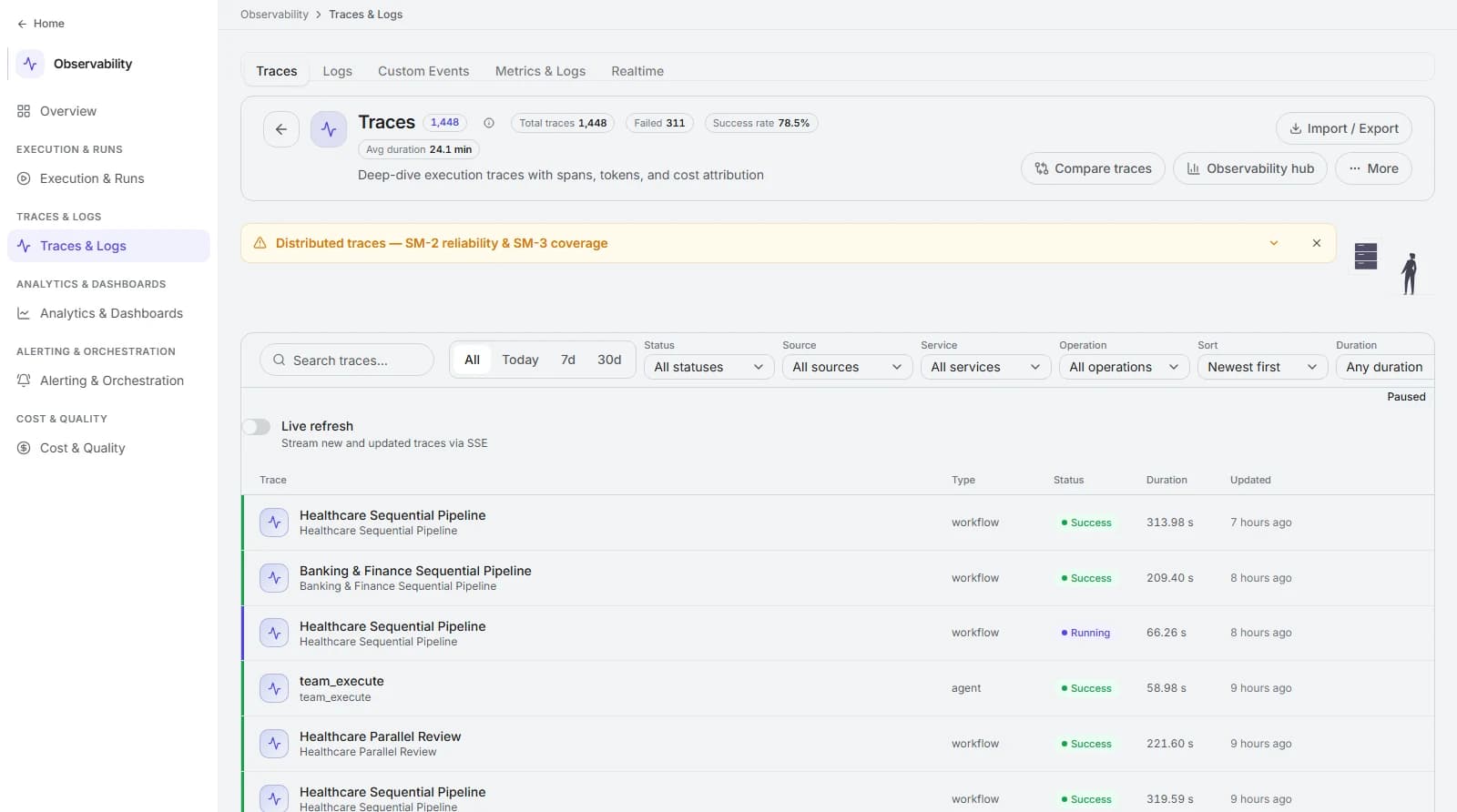
Every run, traced end to end.
1,448 traces with duration, status, and cost attribution - filter by status, source, service, and operation, or stream new runs live.
The return
Minutes off the critical path, at your cost per minute.
You already know what a minute of downtime costs on your critical services. Attribute only the orientation and communication time - over-attribution will not survive the first review with your operations lead.
Mean time to resolve
total incident minutes ÷ number of incidents
Track the orientation segment separately from the repair segment; only the first is what this changes.
Time to first meaningful update
median minutes from incident open to first approved external update
The metric customers and account teams feel most directly, and often the one in your service commitments.
Responder hours per incident
Σ responder minutes ÷ 60 ÷ incidents
Includes everyone pulled onto the bridge. Better orientation usually shrinks the number of people needed as much as the duration.
Repeat incident rate
incidents matching a prior signature ÷ total incidents
If past postmortems are actually being surfaced and used, this should fall over a few quarters.
| Dimension | Before | With Bhogar |
|---|---|---|
| First ten minutes | Four tools opened in sequence while the incident runs. | An orientation brief in the channel before the second responder joins. |
| Using past incidents | Postmortems written, filed, and never found again. | Comparable incidents surfaced by symptom, with what actually fixed them. |
| Communications | Written by whoever has a spare hand, inconsistently and late. | Drafted from live state, approved by the commander, consistent in tone. |
| Postmortem | Reconstructed days later from chat scrollback. | First draft compiled from the recorded timeline and decisions. |
FAQ
Frequently asked questions
Can it take remediation actions automatically?
How does it know which past incident is comparable?
Will the orientation brief be wrong sometimes?
Does this replace our incident management tool?
Keep exploring
Contracts
Extract obligations, deviations, and risk positions from long documents at clause level - with every finding linked to the exact text it came from.
Account briefing
Give every seller a current, cited account brief before every meeting - assembled from CRM, product usage, support history, and your own documents.
Onboarding
Make new joiners self-sufficient faster - role-scoped answers from policy, systems, and team documentation, plus the provisioning workflow behind it.
Replay a real incident with us.
Pick one from the last quarter and we will show what the orientation brief would have contained, and where the minutes would have come from.