Use case · Use case - People & IT
Employee onboarding
Every company documents onboarding and every new joiner still asks a person. BhogarAI gives them a platform that knows the policy, the tools, the team’s way of working, and their own role - and runs the provisioning workflow behind the scenes.
ROI lever
Time to productivity
Onboarding cost is paid twice: the new joiner is not yet productive, and an experienced colleague is answering their questions instead of working. Both halves shrink when the answers are available on demand and scoped to the role.
Reads from
- HR policy and handbook
- IT and access documentation
- Team runbooks and standards
- Training and compliance records
The problem
The handbook exists. Nobody can find the answer in it.
Onboarding content is written once, scattered across systems, and immediately outdated. New joiners default to asking whoever is nearest, which works and is expensive.
Checked by hand today
- HR policies and handbook
- IT setup and access guides
- Team runbooks and standards
- Learning and compliance training
- Org directory and ownership
- Ticketing and service catalogue
““For my role, in my location, on my team - what applies to me and what do I do first?””
Answers are role-dependent but content is not
Policy, tooling, and process differ by role, location, and team. Generic onboarding material forces every new joiner to work out which parts apply to them.
Senior time is the hidden cost
Each interruption is small; in aggregate a team can lose a meaningful fraction of an experienced person’s week to questions with documented answers.
Provisioning runs on chase emails
Access requests, equipment, and training assignments are coordinated manually across IT, HR, and the hiring manager. Something is always missing on day one.
How Bhogar helps
How Bhogar handles employee onboarding
Bhogar answers in the context of who is asking - their role, team, location, and start date - and the same platform runs the onboarding workflow so setup and knowledge stay in step.
Sources
- HR policy and handbook
- IT and access documentation
- Team runbooks and standards
- Training and compliance records
Outcomes
- Role-scoped answers
- Provisioning completed on time
- Training assigned and tracked
- Questions surfaced as gaps
Answers scoped to the person
Role, team, location, and employment type are resolved first, so the answer covers the policy that applies to this joiner rather than every variant of it.
How it works →One place instead of six systems
HR policy, IT guides, team runbooks, and training requirements are searched together, so a new joiner does not need to know which system owns which answer.
How it works →Provisioning as a safe workflow
Access requests, equipment, training assignments, and manager checkpoints run as a durable workflow with approvals, so day-one readiness is tracked rather than chased.
How it works →Confidential material stays confidential
Retrieval respects HR data boundaries. A new joiner can read the parental leave policy without any exposure to case files, compensation data, or another employee’s record.
How it works →
All your data
Policy, tooling, and team practice - with HR boundaries intact.
Onboarding needs breadth across policy and practice but almost no access to personal data. The scope is set accordingly, and confidential HR collections are explicitly excluded.
HR policy and handbook
Leave, expenses, conduct, benefits, and working arrangements, with the variants that apply per country and employment type.
IT and security guidance
Device setup, access request routes, acceptable use, security training requirements, and the service catalogue.
Team documentation
Runbooks, coding and review standards, ways of working, meeting cadence, and glossaries of internal terminology.
Learning and compliance
Required training by role and jurisdiction, completion status, and deadlines that carry a regulatory obligation.
Directory and ownership
Who owns which system, who approves what, and the escalation route for each area - usually the single most-asked question.
Service and ticketing
Request catalogues and forms so the assistant can raise the right request rather than describing how to raise it.
Governance built in
- Confidential HR collections - case files, compensation, performance records - excluded from the onboarding scope entirely.
- Answers scoped by role, team, location, and employment type so jurisdiction-specific policy is applied correctly.
- Provisioning actions run through your existing approval chain; the workflow runrchestrates, managers and IT still approve.
- Compliance training assignment and completion recorded in your system of record, not only in the platform.
- Every answer logged, so a policy question with a wrong answer is traceable to the source document that needs fixing.
The workflow
From signed offer to a productive first fortnight.
The same pattern supports internal transfers, role changes, and re-onboarding after long absence.
A start date is confirmed
The HR system signals the new joiner with role, team, location, manager, and start date.
In the portal
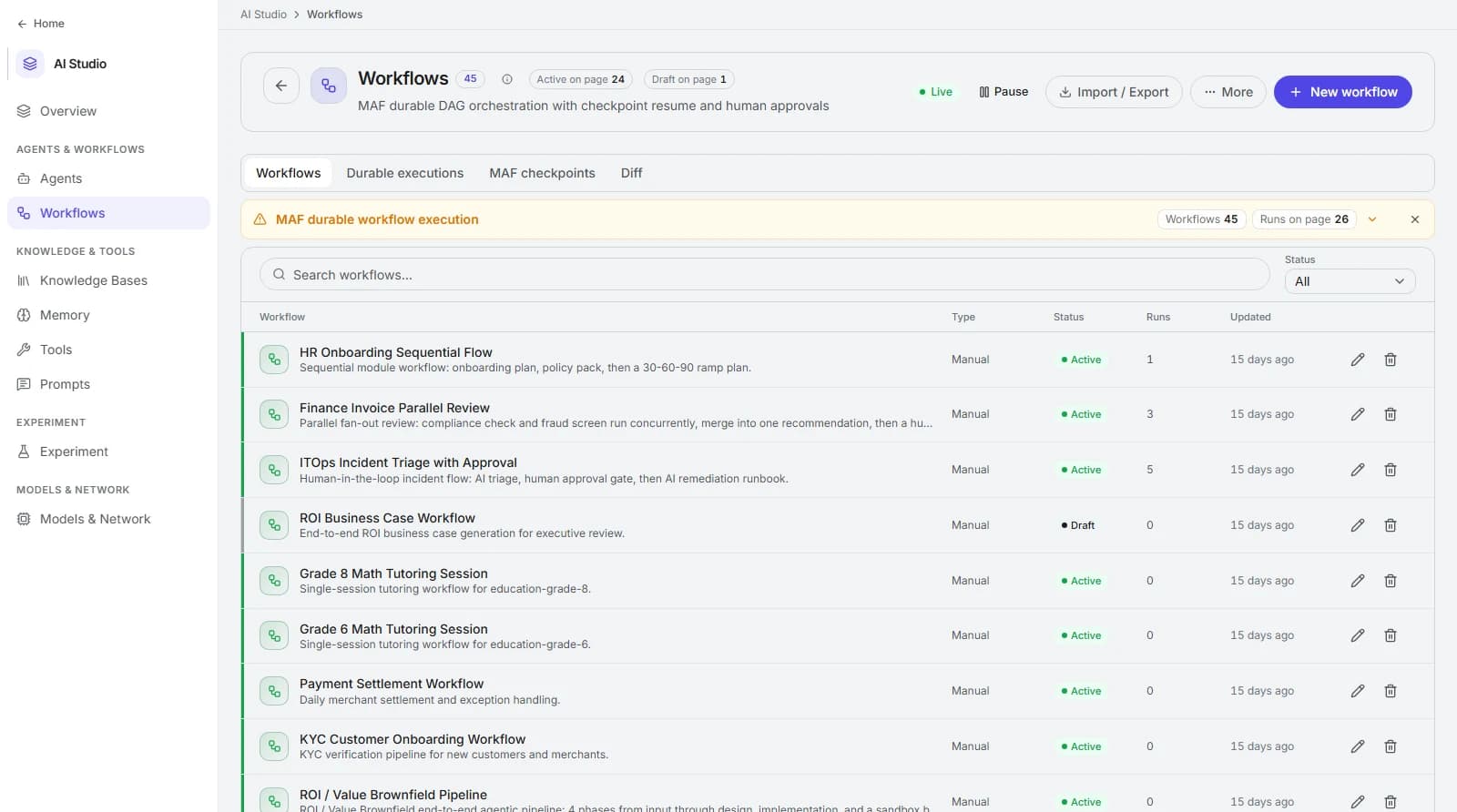
Durable workflows with approvals built in.
Multi-step processes - onboarding, invoice review, incident triage, KYC - run as checkpointed DAGs with human approval gates.
The return
Two costs, both measurable.
Baseline from your last cohort: how long to first meaningful contribution, and how much colleague time went into supporting them.
Time to productivity
median days from start date to first independent contribution
Define “contribution” per role with the hiring managers before you baseline, or the metric will not survive scrutiny.
Colleague hours per new joiner
Σ support minutes from existing staff ÷ 60
The hidden half of onboarding cost, and usually the larger one. Sample it for a cohort rather than estimating it.
Day-one readiness
joiners with all access and equipment ready ÷ total joiners
A workflow metric with a direct effect on the first-week experience and on early attrition.
Compliance training on time
required training completed by deadline ÷ required assignments
Where training carries a regulatory obligation, this is a risk control as much as an efficiency measure.
| Dimension | Before | With Bhogar |
|---|---|---|
| Finding a policy answer | Search the intranet, then ask the nearest colleague. | A role-scoped answer with the source, in the chat tool they already use. |
| Getting access | Chase emails across IT, HR, and the manager. | A tracked workflow through the normal approval routes. |
| Learning team practice | Absorbed slowly by observation and correction. | Runbooks and standards answerable on demand from day one. |
| Improving onboarding | An exit-style survey at the end of month three. | The questions nobody could answer, ranked weekly. |
FAQ
Frequently asked questions
Can new joiners see confidential HR information?
Does it replace a structured onboarding programme?
How do we handle policy that differs by country?
What if our onboarding documentation is poor?
Keep exploring
Reporting
Turn recurring reports into a safe workflow - numbers queried from the warehouse, narrative drafted, variances explained, owner approves.
Deflection
Resolve routine customer and employee contacts at the first touch, with account context and an honest escalation when the answer is not there.
Knowledge search
One question, every approved system - documents, tickets, code, wikis, and records - answered with citations and each person’s own permissions applied.
Start with your next cohort.
Connect the policy and IT sources, run the questions from one intake, and you will have both a readiness baseline and a content backlog within a month.